
The app on board
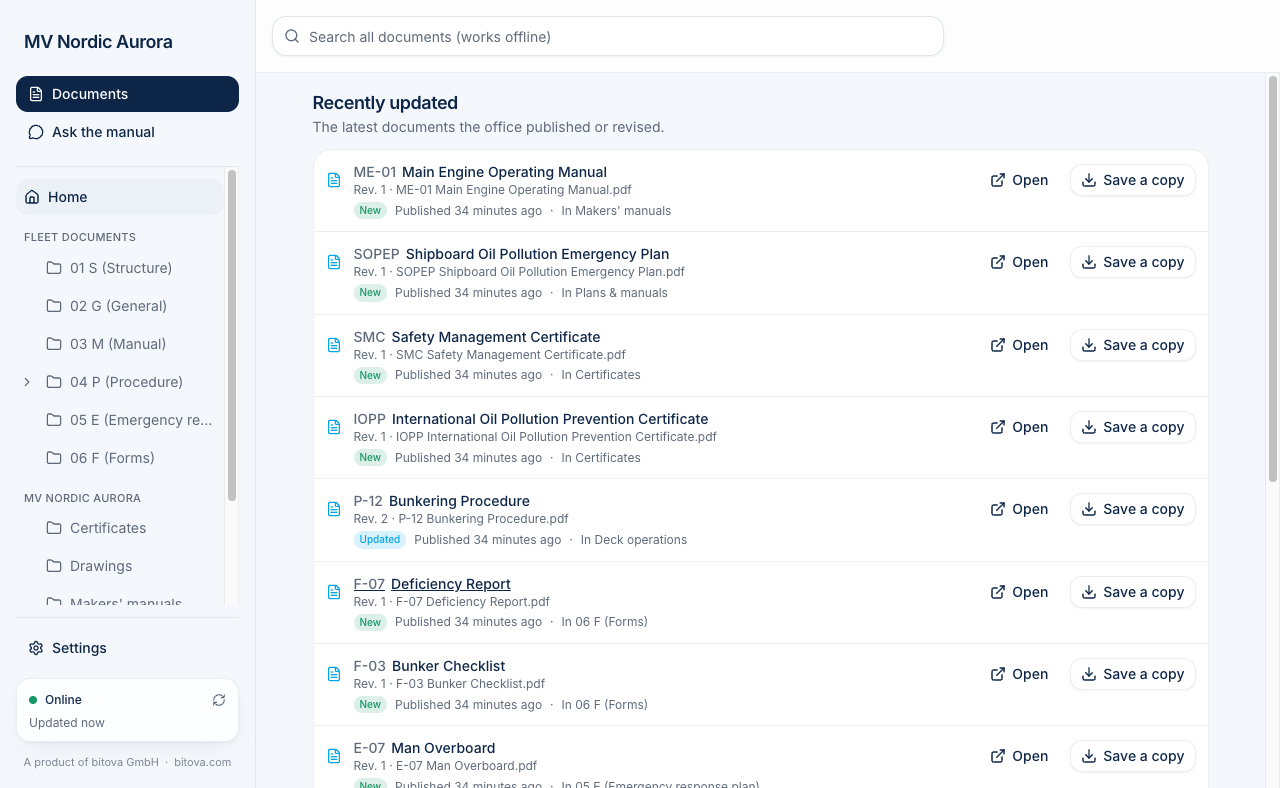
The Maridex app brings your company’s documents to the ship PC: the fleet documents (the safety management manual, circulars, forms – the same for every ship) and this vessel’s own documents (its certificates, plans, drawings and makers’ manuals).
- Everything is on the PC. You can read, search and print it without internet.
- It stays up to date by itself. When the office publishes a new revision, the app downloads it as soon as there is a connection, and the old revision disappears.
- Ask the assistant. With internet, you can ask questions like “What must be checked before bunkering?”. The answer comes only from the documents on this ship, with the exact source.
- Only what belongs on board. Documents the office keeps for itself and other ships’ documents never come to this PC.
- Sending documents to the office. A new certificate or a survey report can simply be forwarded by email to your company’s import address. The office files it, and it comes back to this PC with the next update.
- Forms and copies. You can save a copy of any document, for example to fill in a form.
What you need
Section titled “What you need”- A Windows 10 or 11 PC (64-bit).
- The license number of your company. You get it from your office. It looks like
ABC-123-XYZ. - Internet for the first setup. After that, the app also works offline.
Next steps
Section titled “Next steps”A product of bitova GmbHbitova.com